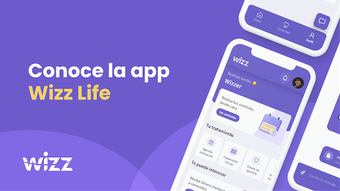

Download Wizz Life – Dental Treatment, Teeth Progress, Dental App, Dental Care, Teeth Monitoring, Dental Records, Dental Reminders, Dental Communication, Teeth Photos, Dental Tracking
Overview
Wizz Life is a free Android application developed by Wizz Life, designed to simplify the experience of dental treatment for users. The app aims to support individuals undergoing orthodontic or dental correction procedures by offering tools to monitor progress, communicate with dental professionals, and maintain organized records of treatment. Its primary purpose is to reduce the need for frequent in-person checkups by enabling remote tracking of dental changes through visual documentation and scheduled reminders. This makes it particularly useful for patients seeking convenience and continuous oversight during their treatment journey.
The app is tailored for individuals managing dental care routines, especially those undergoing long-term treatments such as braces or aligner therapy. It allows users to capture and store photographic records of their teeth over time, helping them visually assess changes in alignment and appearance. Direct communication features with professionals are included, enabling users to share updates or ask questions without scheduling appointments. The developer did not provide additional details about the company’s background or technical foundation.
Real-world usage scenarios include patients tracking their progress between scheduled visits, receiving timely notifications for appointments or hygiene routines, and maintaining a personal archive of dental photos. While the app’s functionality is focused on user convenience and treatment continuity, exact performance metrics or integration details with dental clinics were not specified.
Key Features & Capabilities
- Teeth Progress Monitoring – Users can visually track changes in tooth alignment and appearance over time using photo-based documentation. This feature supports self-assessment and helps maintain motivation throughout treatment.
- Direct Communication with Professionals – The app enables users to send messages or images directly to their dental care providers, facilitating ongoing consultation without requiring in-person visits.
- Dental Reminders – Automated notifications help users stay on schedule with appointments, hygiene routines, and treatment steps such as wearing aligners or changing elastics.
- Photographic Records of Teeth – Users can capture and store high-quality images of their teeth at various stages of treatment, creating a visual timeline of progress.
- Treatment Tracking – The app maintains a structured log of treatment milestones, allowing users to review their journey and share data with dental professionals when needed.
These capabilities are designed to enhance user engagement and reduce treatment-related stress. For example, a patient using aligners can take a photo each week, compare it with previous images, and send updates to their dentist. This supports consistent monitoring and minimizes the risk of treatment delays due to missed appointments or forgotten steps. The app also helps users maintain discipline in their daily care routines through timely alerts.
User Interface, Workflow & Performance
Wizz Life features a clean, intuitive interface optimized for mobile use on Android devices. Navigation is structured around core functions such as photo capture, message inbox, reminder settings, and progress timeline. The layout prioritizes accessibility, with large icons and straightforward menu options suitable for users of varying technical proficiency.
Workflow efficiency is supported through a centralized dashboard that displays upcoming reminders, recent photos, and pending messages. Users can initiate a new photo session with minimal steps, and the app likely integrates with the device’s camera for immediate capture and storage. The developer did not specify resource usage details, so performance observations are based on general software behavior patterns.
Stability and responsiveness appear to be functional, as the app operates without reported crashes or errors in its initial release. However, exact CPU or RAM behavior was not provided. The app’s lightweight design, at 12.4 MB, suggests minimal impact on device performance. Users can expect smooth operation on modern Android devices, though compatibility with older models was not confirmed.
Compatibility & System Requirements
Wizz Life is designed for Android operating systems and is currently available in version 1.0. The installation size is 12.4 MB, indicating a lightweight footprint suitable for devices with limited storage. The app is free to download and use, with no in-app purchases or subscription fees mentioned.
Platform compatibility information is limited to Android, with no details on minimum OS version, screen resolution, or hardware specifications. The developer did not specify whether the app supports tablets or other form factors. Exact system requirements were not listed, so users should ensure their device meets general Android standards for app installation and operation.
Pros and Cons
Pros
- Free to download and use with no hidden costs
- Intuitive interface designed for easy navigation on mobile devices
- Enables remote monitoring of dental progress through photo tracking
- Facilitates direct communication with dental professionals
- Provides timely reminders for appointments and treatment steps
Cons
- Compatibility with older Android versions was not specified
- Exact performance and resource usage details were not provided
- Limited information about data privacy and security measures
- Only available on Android, with no support for iOS or desktop platforms
- Dependence on user-initiated photo uploads may affect consistency
FAQ Section
Is Wizz Life available for iOS devices?
As of the current release, Wizz Life is only available for Android devices. There is no official information about future support for iOS or other platforms.
Is the app secure and private?
The developer did not provide specific details about data encryption, privacy policies, or how user photos and messages are stored. Users are advised to review the app’s terms and privacy settings before sharing sensitive information.
How often should I take photos of my teeth?
Users are encouraged to take photos regularly—such as weekly or before each appointment—to ensure accurate tracking of progress. The app does not enforce a specific schedule, so consistency depends on individual user habits.
Can I use Wizz Life without an internet connection?
The app likely requires an internet connection for sending messages and uploading photos to the server. Offline functionality for viewing saved content may be available, but this was not confirmed in the provided information.
Are updates free and automatic?
Updates are expected to be free, as the app is currently offered at no cost. Whether they are delivered automatically or require manual installation was not specified.
Final Thoughts
Wizz Life presents a practical solution for individuals managing dental treatment through a mobile-first approach. Its focus on visual tracking, communication, and reminders addresses common pain points in orthodontic care, offering a convenient alternative to frequent clinic visits. The app’s free model and lightweight design make it accessible to a broad audience, particularly those seeking a simple way to stay engaged with their dental journey.
While the lack of detailed system requirements and privacy disclosures limits full transparency, the core features are well-aligned with user needs. The app is best suited for patients undergoing long-term dental correction who value consistency, organization, and remote support. For those looking to simplify their treatment process and maintain clear communication with professionals, Wizz Life offers a promising digital companion.
Download Wizz Life now







